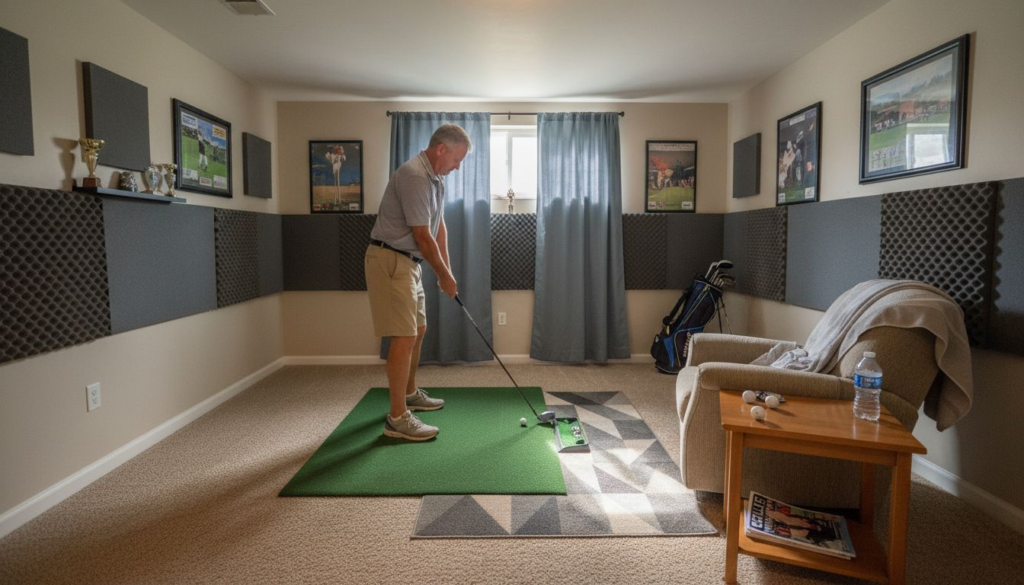
Echo and unwanted noise can quickly ruin the experience in your home golf simulator. Every bounce of sound off walls or hard floors can make conversations unclear and distract you from your game. You want a space where sound is crisp, your simulator feels professional, and distractions are kept to a minimum.
The right acoustic strategies make a powerful difference. By using proven solutions like soft flooring and targeted wall treatments, you can absorb sound and reduce reverberation based on well-researched acoustic principles. Expert findings from NASA and the National Institute of Standards and Technology show how material choice and room layout can transform your simulator environment.
In the steps ahead, you’ll discover practical ways to control echo and create a more enjoyable, focused space for golfing at home. Get ready to learn actionable tips that promise a quieter simulator and a better playing experience.
Table of Contents
Quick Summary
| Takeaway |
Explanation |
| 1. Choose Soft Flooring |
Soft flooring absorbs sound, preventing echoes and enhancing golf simulation. Consider materials like thick carpet or rubber gym flooring. |
| 2. Install Acoustic Panels |
Acoustic panels reduce unwanted echoes and improve sound clarity. Proper placement can reduce echo by up to 70%. |
| 3. Use Ceiling Baffles |
Ceiling baffles absorb sound waves from hard surfaces above, significantly reducing echo and improving audio experience by up to 60%. |
| 4. Add Heavy Curtains |
Heavy curtains act as acoustic barriers, absorbing sound and enhancing room aesthetics while reducing echo by up to 50%. |
| 5. Optimize Room Layout |
A strategically designed room layout with asymmetrical furniture can reduce echo by up to 65%, enhancing sound management. |
1. Choose Soft Flooring to Absorb Sound
Controlling echo in your home golf simulator starts with selecting the right flooring material that can effectively absorb sound waves and reduce acoustic reflections. Soft flooring isn’t just about comfort – it’s a strategic acoustic solution that can dramatically improve your indoor golfing experience.
Soft floor coverings work by interrupting sound wave patterns and preventing them from bouncing off hard surfaces. When sound waves hit dense, porous materials like carpet or padded underlayment, they get trapped and dissipated rather than ricocheting around your simulator space.
Research from
NASA’s acoustic absorption studies demonstrates how material thickness and surface characteristics directly impact sound absorption coefficients. The softer and more textured your flooring, the more effectively it will reduce echo.
Here are some top soft flooring options for golf simulator spaces:
- Thick carpet with dense padding
- Rubber gym flooring with sound-absorbing properties
- Interlocking foam tiles
- Padded vinyl with acoustic underlayment
The key is choosing flooring that provides both sound absorption and impact protection for your simulator area.
When selecting your flooring, consider these additional factors:
- Thickness of the material
- Density of the padding
- Total surface area coverage
- Compatibility with golf simulator equipment
Pro tip: Install a multi-layered flooring system with both sound-absorbing and shock-absorbing properties to maximize acoustic performance and equipment protection.
2. Install Acoustic Panels for Wall Treatment
Acoustic panels are a powerful solution for reducing unwanted echo in your home golf simulator, transforming a potentially noisy space into a crisp acoustic environment. These specialized wall treatments absorb sound waves instead of allowing them to bounce and create disruptive reverberation.
Systematic acoustic research demonstrates that strategic wall treatments can significantly improve sound clarity and minimize unwanted noise reflections. The science behind acoustic panels is straightforward: they are designed to capture and dissipate sound energy rather than reflect it.
When selecting acoustic panels for your golf simulator, consider these key factors:
- Material composition (fiberglass, mineral fiber)
- Sound absorption coefficient
- Aesthetic design
- Ease of installation
Strategic panel placement can reduce echo by up to 70% in indoor spaces.
Typical acoustic panel placement zones include:
- Behind the simulator screen
- Parallel side walls
- Rear wall of the simulator area
- Ceiling perimeter
Professional acoustic treatments range from specialized foam panels to more decorative fabric-wrapped options that blend seamlessly with home decor.
Pro tip: Alternate panel thickness and placement to create a more comprehensive sound absorption strategy that prevents standing wave formations.
3. Add Ceiling Baffles to Minimize Echo
Ceiling baffles are a sophisticated acoustic solution that can dramatically reduce echo in your home golf simulator space. These vertical hanging panels are engineered to interrupt and absorb sound waves that would typically bounce off hard ceiling surfaces.
NASA acoustic research demonstrates how specialized materials can effectively absorb broadband noise and minimize unwanted sound reflections. Ceiling baffles work by breaking up sound wave patterns and preventing them from creating persistent echoes in enclosed spaces.
Key benefits of installing ceiling baffles include:
- Reduced sound reverberation
- Improved acoustic clarity
- Enhanced simulator audio experience
- Minimal visual intrusion
Strategic ceiling baffle placement can reduce echo by up to 60% in indoor environments.
When selecting and installing ceiling baffles for your golf simulator, consider these important factors:
- Material density and sound absorption coefficient
- Size and coverage area
- Aesthetic compatibility with room design
- Ease of installation and maintenance
Ceiling baffles come in various materials including fiberglass, fabric-wrapped panels, and perforated acoustic materials that can blend seamlessly with your home decor while providing superior sound management.
Pro tip: Alternate the height and angle of your ceiling baffles to create a more comprehensive sound absorption strategy that prevents standing wave formations.
4. Use Heavy Curtains for Additional Dampening
Heavy curtains are an often overlooked yet powerful acoustic solution for your home golf simulator that can significantly reduce sound reflections and echo. These dense fabric panels work as acoustic barriers that absorb and soften sound waves traveling through your space.
Acoustic research in indoor environments confirms that thick curtain materials effectively absorb sound across multiple frequencies, creating a more controlled acoustic environment.
Key advantages of using heavy curtains include:
- Noise absorption across frequencies
- Improved sound clarity
- Aesthetic room enhancement
- Easy and cost-effective installation
Strategic curtain placement can reduce echo by up to 50% in indoor spaces.
When selecting curtains for acoustic treatment, consider these important factors:
- Fabric density and thickness
- Material composition (wool, velvet, heavy cotton)
- Full floor-to-ceiling coverage
- Color and design compatibility
Optimal curtain placement includes covering windows, bare wall sections, and areas with hard reflective surfaces near your golf simulator setup.
Pro tip: Select multi-layered curtains with dense fabric backing for maximum sound absorption and create a more immersive acoustic environment.
5. Optimize Room Layout for Sound Control
Room layout plays a critical role in managing acoustic performance for your home golf simulator, transforming how sound waves travel and interact within the space. Strategic spatial arrangement can dramatically reduce unwanted echo and create a more immersive audio experience.
NASA’s acoustic design research demonstrates how thoughtful spatial configuration can control sound reflections and optimize reverberation times in enclosed environments.
Key considerations for sound-optimized room layout include:
- Asymmetrical furniture placement
- Strategic acoustic barrier positioning
- Irregular surface distribution
- Minimizing parallel reflective surfaces
Careful room design can reduce echo by up to 65% without expensive acoustic treatments.
When configuring your golf simulator space, implement these layout strategies:
- Position simulator screen away from direct wall reflections
- Use furniture and equipment to break up sound wave paths
- Create uneven surface textures to disrupt sound reflections
- Avoid creating long, untreated rectangular rooms
Pro tip: Incorporate furniture and decorative elements at varied heights and angles to naturally interrupt sound wave trajectories and minimize echo buildup.
6. Seal Gaps and Openings for Noise Isolation
Sound travels through the smallest openings in your home golf simulator room like water through a sieve. Sealing gaps and cracks becomes a critical strategy for creating a controlled acoustic environment that prevents sound leakage and minimizes external noise intrusion.
U.S. Department of Energy research highlights how proper sealing techniques can dramatically improve noise isolation and room acoustics.
Key areas to focus on for sound isolation include:
- Window frame perimeters
- Door edges and thresholds
- Electrical outlet boxes
- Structural wall penetrations
- Ceiling and floor junction points
Comprehensive gap sealing can reduce noise transmission by up to 75%.
When sealing your golf simulator space, use these targeted strategies:
- Apply weatherstripping around door and window frames
- Use acoustic caulk for small structural gaps
- Install foam gaskets behind electrical outlet covers
- Apply expanding foam sealant for larger wall penetrations
Pro tip: Invest in high-quality acoustic sealants that remain flexible and maintain their sound-blocking properties over time, preventing future sound leakage.
7. Select Quiet Simulator Equipment
The equipment inside your golf simulator plays a crucial role in managing acoustic performance, with each component potentially contributing to or reducing unwanted echo. Selecting quiet simulator components is not just about noise reduction but creating an immersive and professional gaming experience.
NIOSH’s Buy Quiet initiative emphasizes the importance of choosing machinery with low noise emissions to improve overall environmental quality.
Key considerations when selecting quiet simulator equipment include:
- Electronic sensor noise levels
- Projection system decibel ratings
- Computer and cooling system sound output
- Impact absorption of hitting mat
- Mechanical component vibration characteristics
Choosing low-noise equipment can reduce ambient simulator noise by up to 50%.
Prioritize these aspects when evaluating simulator components:
- Request noise specification sheets from manufacturers
- Test equipment in person before purchasing
- Check independent reviews focusing on sound performance
- Consider professional installation for noise-optimized setup
Pro tip: Invest in high-quality, precision-engineered simulator components with rubber mounting and sound-dampening technologies to minimize operational noise.
Below is a comprehensive table summarizing the strategies discussed throughout the article for improving sound control in a home golf simulator.
| Strategy |
Implementation |
Expected Results |
| Soft Flooring |
Use dense, padded materials like carpet or foam tiles to absorb sound waves. |
Reduced echo and improved acoustic comfort. |
| Acoustic Wall Panels |
Install panels made of fiberglass or mineral fibers on walls. |
Enhanced sound clarity by minimizing reflections. |
| Ceiling Baffles |
Place vertical panels on the ceiling to break sound wave patterns. |
Significant reduction in ceiling reflections and reverberation. |
| Heavy Curtains |
Hang dense fabrics like velvet or wool over windows and reflective surfaces. |
Improved absorption of sound across multiple frequencies. |
| Optimized Room Layout |
Arrange furniture asymmetrically and avoid parallel surfaces. |
Natural interruption of sound wave paths and reduced echo. |
| Sealing Openings |
Seal gaps around windows, doors, and outlets with acoustic materials. |
Minimized external noise intrusion and optimized sound isolation. |
| Quiet Equipment |
Choose gear with low noise emissions and sound-dampening features. |
Reduced ambient simulator noise and enhanced focus. |
Elevate Your Home Golf Simulator Experience with Expert Acoustic Solutions
Struggling with unwanted echo and noisy distractions in your home golf simulator can take the joy out of every swing. This article highlights critical strategies such as using soft flooring, installing acoustic panels, and sealing gaps to create the perfect acoustic environment. If you want to move beyond DIY fixes and truly optimize sound clarity and immersion, expert help is the way forward.
At Atlanta Home Theater, we specialize in transforming challenging spaces into peaceful, professional-grade entertainment zones. Our team of over 40 skilled professionals offers tailored solutions ranging from premium acoustic treatments to seamless smart home integrations. Discover how our expertise in sound management can help you achieve reduced echo, improved clarity, and an immersive golf simulator experience. Explore our
Sound Advice Archives – Atlanta Home Theater to learn more about advanced home audio solutions or visit our main site at
Atlanta Home Theater for a personalized consultation.
Ready to take your home golf simulator to the next level today? Connect with our experts and start creating a quieter, more enjoyable environment that matches your passion and dedication.
Frequently Asked Questions
What type of flooring should I choose to reduce echo in my golf simulator?
Choosing soft flooring, such as thick carpet, rubber gym flooring, or padded vinyl, can significantly absorb sound and reduce echo. Opt for materials with density and thickness to maximize their acoustic properties.
How can I use acoustic panels to minimize echo in my golf simulator space?
Install acoustic panels on walls to absorb sound waves and prevent reverberation. Focus on areas like the wall behind the simulator screen and parallel side walls to improve sound clarity and reduce echo by up to 70%.
What are the benefits of adding ceiling baffles to my golf simulator?
Ceiling baffles are designed to absorb sound waves and minimize echo in enclosed spaces. By strategically placing these panels, you can improve the audio experience and reduce reverberation by up to 60%.
How can heavy curtains help with echo reduction in my simulator area?
Heavy curtains act as acoustic barriers, absorbing sound waves and significantly reducing echo. Ensure they cover windows and any hard reflective surfaces to improve sound quality by up to 50%.
What layout considerations should I keep in mind for my golf simulator?
Arrange furniture and equipment asymmetrically to disrupt sound wave patterns and reduce echo. Avoid placing the simulator screen directly in line with walls to minimize reflections and improve overall acoustic performance.
How can I seal gaps in my simulator room for better noise control?
Sealing gaps around windows, doors, and electrical outlets can greatly reduce sound leakage. Use weatherstripping and acoustic caulk to effectively block noise, potentially reducing transmission by up to 75%.
Recommended