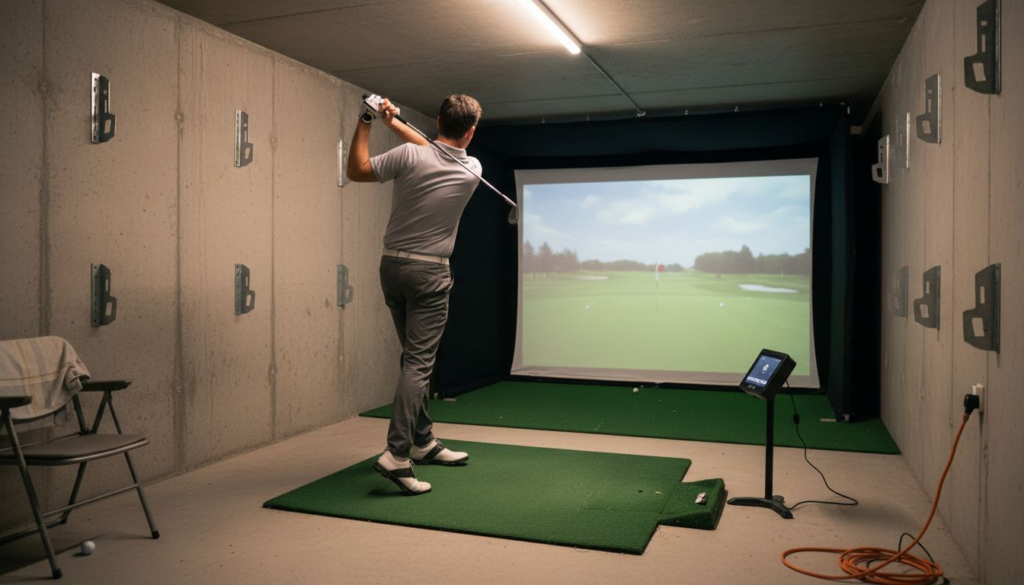
Setting up a home golf simulator is more than just adding equipment to a spare room. The choices you make about space, technology, and layout can make the difference between a cramped setup and an immersive, enjoyable practice zone. Without the right planning, you risk wasted investments and a less-than-realistic experience.
This guide will show you practical steps to transform any eligible space into a personal golf training hub. You will discover how to use proven space planning principles, select technology that fits your needs, and create an environment that encourages real improvement. Get ready to unlock ideas and tips that will help you avoid costly mistakes and build a golf simulator room tailored for both comfort and performance.
Table of Contents
Quick Summary
| Key Insight |
Description |
| 1. Assess Room Requirements |
Ensure your room is a minimum of 12 feet wide and 18 feet long for optimal simulator functionality. This space accommodates swings and equipment movement effectively. |
| 2. Choose Advanced Technology |
Select from optical, radar, or infrared tracking systems for accurate performance tracking and immersive experience tailored to your budget. |
| 3. Invest in Quality Mats |
Use high-performance hitting mats for realistic practice interaction and to minimize wear on clubs, enhancing your overall practice quality. |
| 4. Optimize Screen and Projector |
Pair a durable impact screen with a high-resolution projector (minimum 1080p) for an immersive simulation experience with maximum visual fidelity. |
| 5. Plan Electrical and Lighting Setup |
Install a dedicated circuit and proper lighting to minimize glare and ensure consistent illumination for a professional-level training environment. |
1. Assess Room Size and Layout for Your Simulator
Creating the perfect home golf simulator starts with a strategic room assessment. Your available space determines not just the feasibility of installation but also the quality of your golfing experience.
Room size plays a critical role in golf simulator performance. Professional recommendations suggest a minimum area of
12 feet wide by 18 feet long to accommodate a comfortable swing and projection setup. This dimension allows for:
- Full range of motion during golf swings
- Adequate screen projection distance
- Space for additional simulator equipment
- Comfortable movement around the simulator
When evaluating your space, consider
interior design space planning principles that focus on creating functional environments. The goal is to balance available square footage with optimal simulator functionality.
A well-planned golf simulator room transforms limited space into a personalized athletic training environment.
Key considerations for room layout include ceiling height (minimum 9-10 feet recommended), floor surface stability, and proximity to electrical outlets. Avoid rooms with obstructions like low-hanging light fixtures or furniture that could interfere with your swing.
Lighting and visibility are also crucial. Natural light can create glare on projection screens, so consider rooms with controlled lighting or the ability to block external light sources.
Pro tip: Before purchasing your simulator, use painter’s tape to mark out the proposed setup area and practice mock swings to verify actual usable space.
2. Choose the Right Golf Simulator Technology
Picking the perfect golf simulator technology transforms your home practice experience from mediocre to magnificent. Modern indoor golf systems offer sophisticated tracking mechanisms that capture every nuance of your swing and ball trajectory.
Golf simulator technologies vary widely, with three primary tracking systems dominating the market:
- Optical Sensor Systems: Track ball and club movement using high-speed cameras
- Radar-Based Technologies: Use doppler radar to measure ball speed and spin
- Infrared Tracking: Capture precise club and ball data through infrared sensors
Golf simulator technologies have evolved to recreate remarkably realistic playing conditions. The key is selecting a system that balances
accuracy,
price, and
home compatibility.
Advanced simulation technologies can replicate course conditions with stunning precision.
When evaluating simulator technologies, consider factors like:
- Tracking accuracy
- Projection quality
- Software realism
- Compatibility with your space
- Budget constraints
Some high-end systems offer
photorealistic course rendering and comprehensive swing analysis. Professional-grade simulators can track club head speed, launch angle, spin rates, and provide immediate performance feedback.
Pro tip: Test multiple simulator technologies at local golf shops before making a significant home investment to ensure the system matches your personal playing style and expectations.
3. Install Quality Hitting Mats and Turf
The foundation of an exceptional home golf simulator lies beneath your feet. Quality hitting mats and turf are not just accessories but critical components that dramatically impact your practice experience and equipment longevity.
Synthetic turf guidelines highlight crucial selection criteria for simulator surfaces. The right mat protects your clubs while providing realistic ball and club interaction.
Key characteristics of high-performance hitting surfaces include:
- Shock absorption to reduce joint stress
- Realistic grass-like texture
- Durability under repeated golf swings
- Consistent ball and club performance
- Minimal club head wear
A superior hitting surface transforms simulator practice from good to extraordinary.
When selecting mats and turf, consider these critical factors:
- Fiber density and quality
- Backing material strength
- Cushioning technology
- Compatibility with your simulator system
- Maintenance requirements
Professional-grade mats typically feature multi-layer construction with specialized shock-absorbing underlayments. These advanced materials mimic natural grass while protecting both your clubs and body from excessive impact stress.
Pro tip: Invest in a mat with replaceable hitting strips to extend overall surface life and maintain consistent performance across your simulator setup.
4. Select an Impact Screen and Projector Setup
Your golf simulator’s visual experience hinges on selecting the perfect impact screen and projector combination. This critical setup transforms your space into an immersive golfing environment where every shot feels like a real course experience.
Projection technologies require careful consideration of multiple technical parameters. The right screen and projector pairing delivers stunning visual realism while protecting your investment.
Key considerations for your simulator screen and projector include:
- Screen material durability
- Projection resolution
- Throw distance compatibility
- Impact resistance
- Image clarity
A high-quality impact screen turns your simulator from a simple practice tool into a professional training environment.
Screen materials range from specialized tension fabrics to tightly woven polyester blends.
Professional-grade screens typically feature:
- Multiple layer construction
- Specialized impact-absorbing backing
- Minimal light reflection
- High tensile strength
- Quick ball rebound characteristics
Projector selection demands attention to
resolution and brightness. Most home simulators require a minimum of 1080p resolution with 3000-4000 lumens for optimal image quality.
Pro tip: Consider purchasing a slightly oversized screen to provide additional margin for ball impacts and ensure maximum visual coverage of your simulator setup.
5. Plan for Lighting and Electrical Needs
A well-designed electrical and lighting setup transforms your golf simulator from a basic room into a professional training environment. Strategic planning prevents common pitfalls that could compromise your simulator’s performance and user experience.
Lighting design principles require careful consideration of multiple technical factors. Your simulator demands specialized electrical and illumination strategies to ensure optimal functionality.
Essential electrical and lighting considerations include:
- Dedicated circuit requirements
- Proper voltage and amperage
- Glare reduction techniques
- Uniform illumination
- Minimal shadowing
- Heat management
Precision lighting creates the difference between an average and extraordinary simulator experience.
Your electrical planning should focus on:
- Installing a dedicated 20-amp circuit for simulator equipment
- Ensuring proper grounding and surge protection
- Planning cable management and concealment
- Calculating total power consumption
- Consulting a licensed electrician
Lighting placement is critical. Position lights to minimize screen glare while providing consistent illumination across your hitting area. LED fixtures with adjustable color temperatures offer the most flexibility for simulator environments.
Pro tip: Invest in dimmable LED lighting with remote control capabilities to quickly adjust illumination levels without interrupting your practice session.
6. Integrate Smart Home Features for Convenience
Transforming your golf simulator into a cutting-edge smart home experience elevates your practice sessions from ordinary to extraordinary. Modern technology allows seamless integration that enhances both functionality and user experience.
IoT home automation enables sophisticated control of your simulator environment through intelligent systems. Voice commands and mobile apps can now manage every aspect of your setup.
Key smart home features for your golf simulator include:
- Voice-activated system startup
- Automated lighting adjustments
- Climate control integration
- Remote system monitoring
- Performance tracking and data logging
Smart home technology turns your simulator into an intelligent, responsive training ecosystem.
Advanced integration options allow you to:
- Control simulator settings through smartphone apps
- Use voice assistants like Alexa or Google Home
- Automate lighting and environmental conditions
- Track and store performance metrics
- Receive maintenance alerts and system diagnostics
Connectivity platforms can synchronize your simulator with other smart home devices. Imagine adjusting room temperature or dimming lights without interrupting your practice swing.
Pro tip: Select smart home devices with compatible communication protocols like WiFi or Zigbee to ensure smooth integration and minimize technical complications.
7. Test and Calibrate Your Golf Simulator System
A perfectly calibrated golf simulator transforms raw technology into a precision training tool. Systematic testing ensures your investment delivers accurate performance metrics and an immersive golfing experience.
Calibration processes are fundamental to achieving reliable simulator performance. Think of calibration as fine-tuning an instrument to guarantee consistent and accurate results.
Essential calibration steps include:
- Verifying sensor alignment
- Checking ball tracking accuracy
- Adjusting swing detection parameters
- Validating projection system
- Synchronizing software settings
Precision calibration bridges the gap between technology and authentic golfing performance.
Your calibration checklist should cover:
- Initial system diagnostic scan
- Sensor alignment verification
- Ball tracking accuracy tests
- Software parameter adjustments
- Performance benchmark comparisons
Simulator accuracy depends on meticulous setup and regular recalibration. Manufacturers typically recommend professional calibration every 6-12 months or after significant equipment changes.
Key technologies like
infrared sensors and
doppler radar require periodic realignment to maintain peak performance. Minor misalignments can significantly impact swing and ball flight data.
Pro tip: Schedule an annual professional calibration service and maintain a log of your simulator’s performance metrics to track long-term system health and accuracy.
Below is a comprehensive table summarizing the key topics and considerations for designing and setting up a home golf simulator as discussed in the article.
| Category |
Details |
| Room Size and Layout |
Minimum dimensions: 12’x18’; ceiling height: 9-10’; consider electrical outlets and lighting. |
| Golf Simulator Technology |
Types: Optical sensors, radar-based, and infrared; balance accuracy, budget, and compatibility. |
| Hitting Mats and Turf |
Features: Shock absorption, realistic texture, durability; supports club and physical health. |
| Impact Screens and Projectors |
Select durable, high-resolution screens; projectors require 1080p and 3000+ lumens. |
| Lighting and Electrical |
Ensure dedicated circuits, manage glare and shadows with well-placed dimmable LED lights. |
| Smart Home Integration |
Features: Voice control, automated systems, performance tracking, climate control options. |
| Calibration and Testing |
Perform diagnostic scans, align sensors, and adjust parameters for accuracy and realism. |
Elevate Your Home Golf Simulator with Expert Technology and Integration
Setting up a golf simulator at home is exciting but can present challenges like optimizing room size, selecting the right technology, managing lighting, and smart home integration. Key priorities include achieving precise sensor calibration, ensuring proper lighting for minimal glare, and choosing durable impact screens and turf that make your practice feel authentic. At Atlanta Home Theater, we understand these essentials and specialize in creating fully integrated, immersive golf simulator environments tailored to your space and needs.
Discover how our team of over 40 professionals brings together advanced golf simulation systems, automated lighting solutions, and smart home controls to transform your golf setup into an effortless and engaging experience. Explore expert tips and solutions through our
Sound Advice Archives – Atlanta Home Theater. Ready to perfect your home golf simulator with cutting-edge technology and seamless control Visit
Atlanta Home Theater today and schedule your personalized consultation to start transforming your space.
Frequently Asked Questions
What room size is ideal for a golf simulator setup at home?
A room size of at least 12 feet wide by 18 feet long is ideal for a golf simulator setup. This space allows for a full range of motion during swings and accommodates necessary equipment, enhancing your practice experience.
How do I select the right technology for my golf simulator?
Choose a golf simulator technology by comparing optical sensor systems, radar-based technologies, and infrared tracking systems. Test different systems to find one that fits your budget and matches your playing style.
What should I look for in hitting mats and turf for my simulator?
When selecting hitting mats and turf, prioritize shock absorption, realistic texture, and durability. Opt for professional-grade mats that can withstand repeated use while providing consistent ball performance.
How can I set up an effective impact screen and projector combination?
Select an impact screen that is durable and has minimal light reflection, pairing it with a projector of at least 1080p resolution. Ensure the screen and projector are compatible with each other to achieve optimal image quality in your simulation environment.
What lighting and electrical needs should I consider for my golf simulator?
Plan for a dedicated electrical circuit and choose lighting that minimizes glare on your impact screen. Aim for uniform illumination and consider dimmable LED lights to adapt to different practice conditions.
Calibrate your golf simulator by verifying sensor alignment and checking ball tracking accuracy. Schedule a professional calibration annually to maintain precision and ensure your simulator delivers reliable performance metrics.
Recommended